

In this guest article, Peter writes about an early computer that most of us have probably not heard about before.
The P101
My first exposure to information technology was definitely before that term came into common use. It was probably the fall of 1967, and I was a student at Beaverton High School (BHS) in a suburb of Portland, Oregon. A class mate, whom I will call Jim, and I discovered the school had a computer.
Yes, computers existed in the 60’s; I just hadn’t seen one before IRL. It would be improper to say we drooled when we found it. In those days, people in polite society did not drool. When we turned it on, it transported us to a new state of enlightenment. Looking back, we were nerds, but the first OED citation of “computer nerd” was in 1982. So I guess Jim and I were proto-nerds.
Using Grok to look up obscure information like when “nerd” came into usage — well, that was beyond our imagination the day we opened the manual for the Olivetti Programma 101, also known as a Perottina or P101.
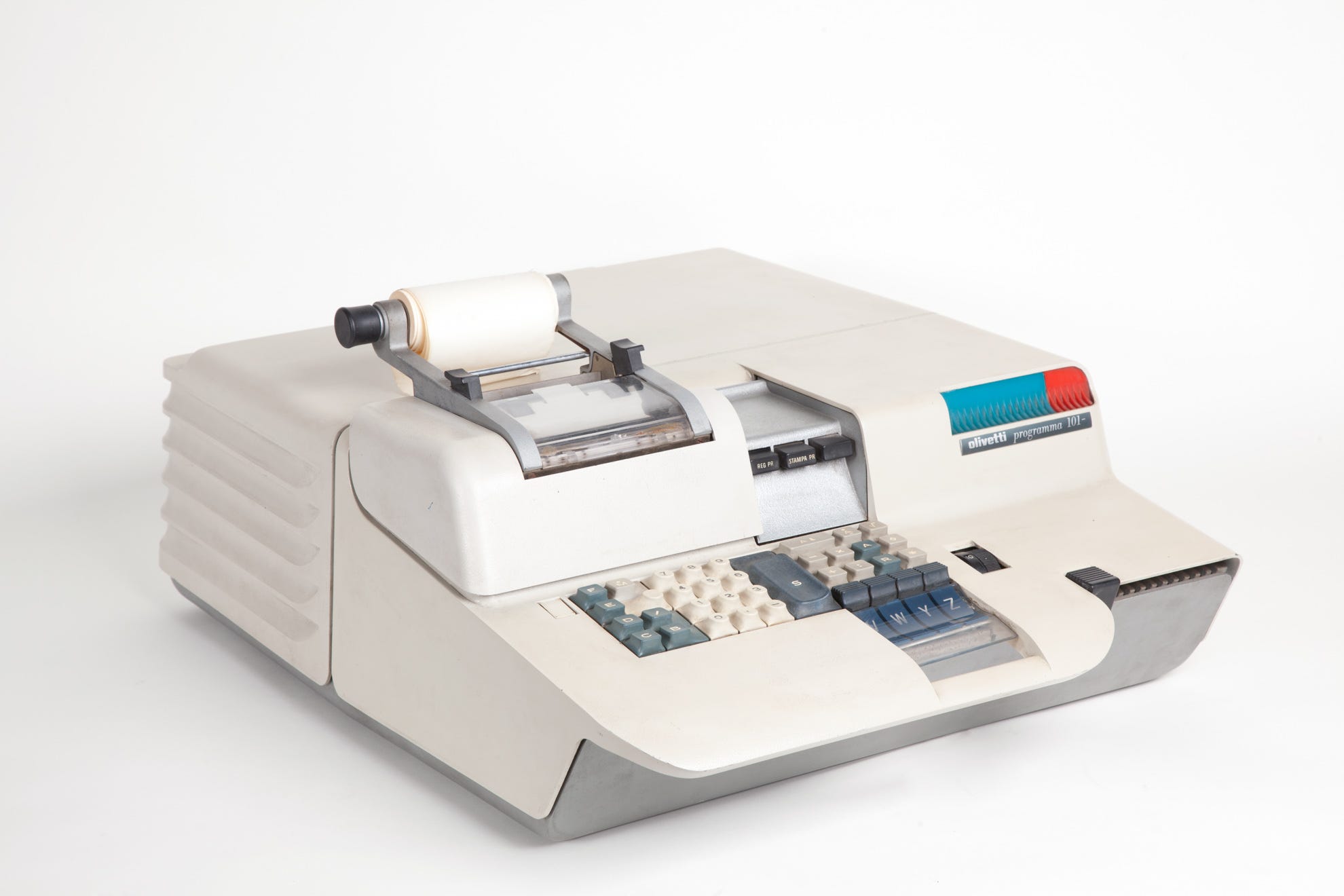
The computer was designed by the engineer Pier Giorgio Perotto, working for the Italian manufacturer Olivetti. If you know the company, it’s probably because of their typewriters, one of which I used to type high school and college papers.
The P101 was built before microprocessors and designed in the early days of integrated circuits. It was made of individual basic components such as resisters and diodes. If we had disassembled it, I imagine it would have looked a bit like the ham radio transmitter I had assembled from parts scrounged at my local Radio Shack.
Though Olivetti sold only 44,000 P101 units, at about $3,200 each (equivalent to $32,700 in 2025)1, my high school had somehow acquired one.
Unknown to us, NASA had purchased about 10 to use in planning the Apollo 11 mission to the moon. In a NASA Oral History Transcript, on page 23, David W. Whittle explained how they used one to compute coordinates for pointing the Lunar Module’s high-gain antenna toward Earth.
Hold that thought because it I will come back to that further below.
We two nerds knew none of that; all we knew was BHS had one and we could use it. We found the P101 beauty in a storage room and began exploring how it worked. To put this story in perspective, let’s pause and describe a P101.
It sits on a desktop, which is rather important when you consider that computers filled rooms in the 60’s. Here are the specifications as described in Wikipedia.
Size: 275 mm ( A ) x 465 mm ( L ) x 610 mm ( P )
Weight: 35.5 kg
Consumption: 0.35 kW
Output device: 30 column printer on 9 cm paper
Accuracy: 22 digits and up to 15 decimal places (this is important)
Operations: add, subtract, multiply, divide, square root and absolute value
Total memory: 240 bytes in the ALU (estimated) [AP 10]
Keyboard: 36 keys.
Archive: Magnetic card reader
It weighed a touch over 78 pounds, but more importantly the accuracy would become an educational lesson for my future IT career. Also note that the memory is measured in bytes, not megabytes or gigabytes; that is not a typo. I have no idea what modern device has anywhere close to 240 bytes of memory.
Programs were entered on a keyboard and printed on a paper tape. The keyboard and paper tape were also the data entry and output devices. Programs could be saved to a magnetic card and executed later. For longer programs, multiple cards could be saved, which if you are willing to stretch the definition, was an archaic form of modular programming.
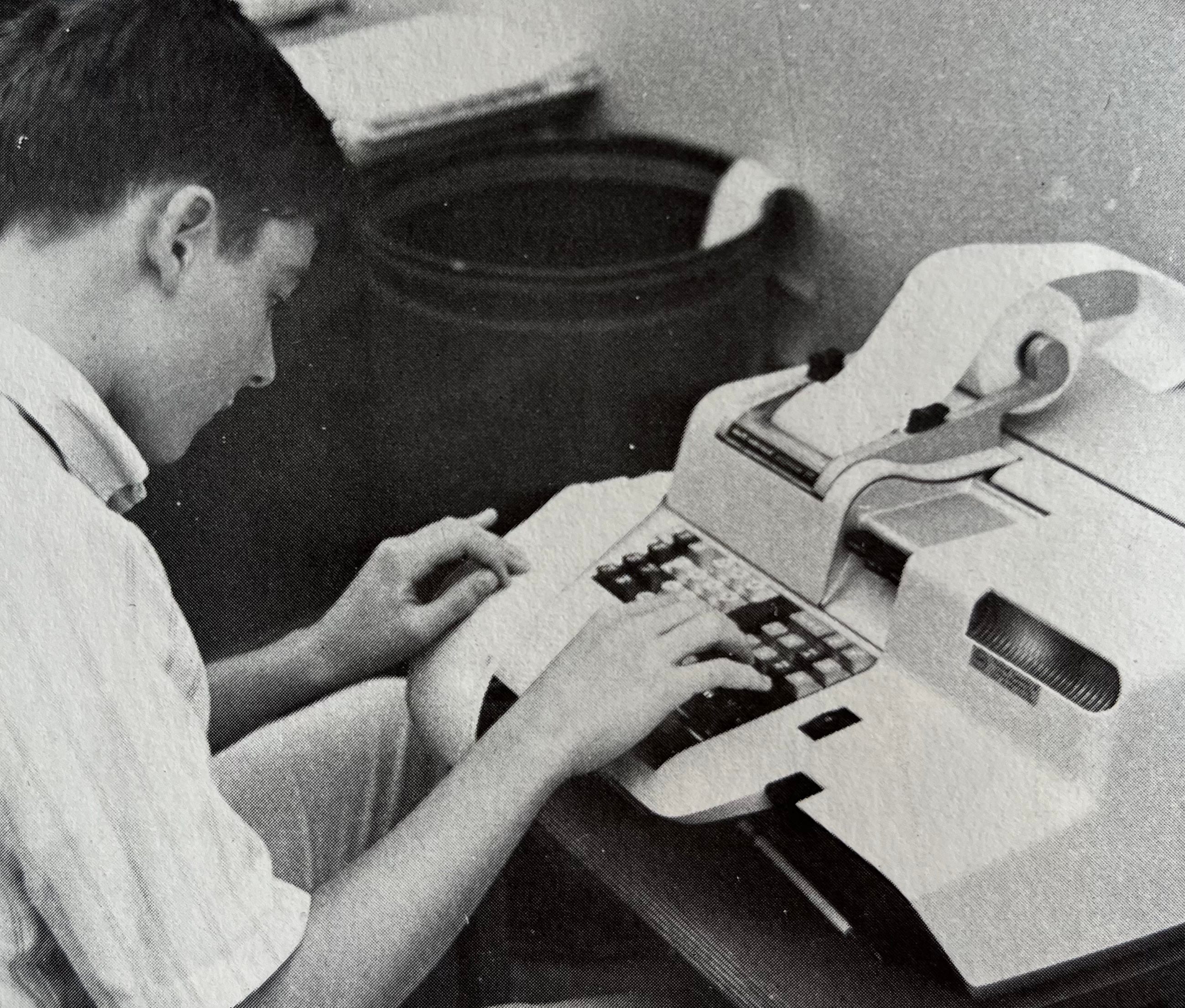
One can argue the P101 instruction set is not a language per se, and is more primitive than assembly languages. I would later learn and write in more than two dozen programming languages; this was the first.
When running the program, data entry was performed by executing the “S” Opcode to halt and allow input on the keyboard. Output was performed by the print function, which printed a register on the paper tape.
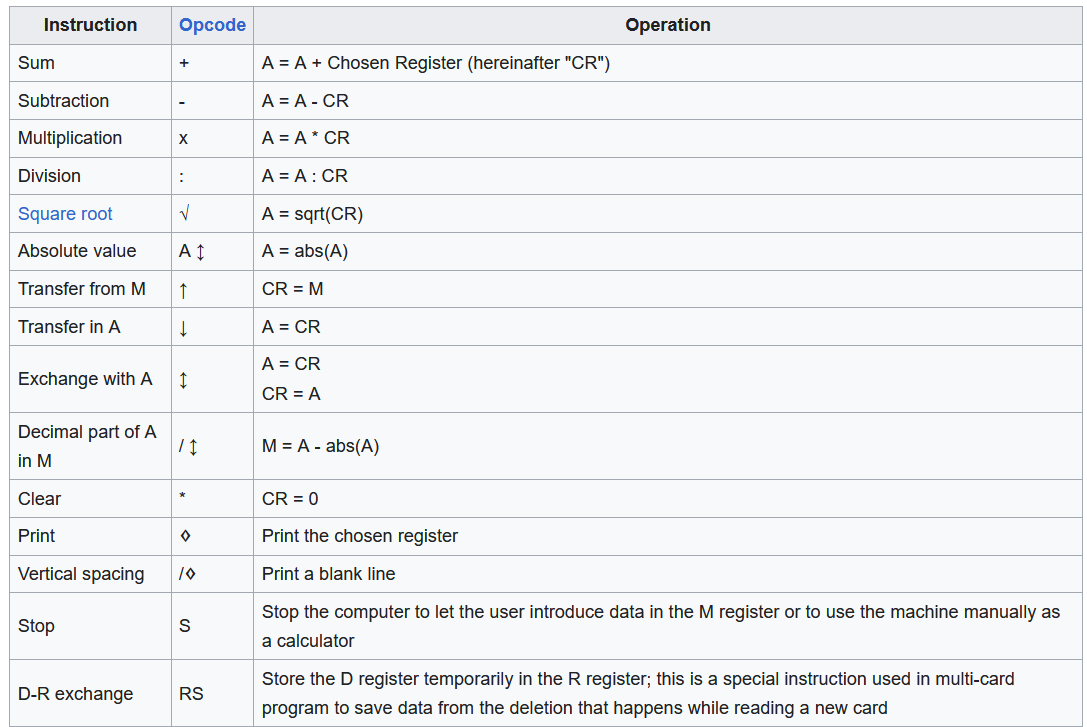
Before we could do anything useful with the computer, we had to figure out how the registers worked. We learned fairly quickly that to perform arithmetic, one loads numbers in registers and then invoke the command to add, subtract, multiply, or divide using the registers.
Comparing it to a scientific calculator, registers are like the memory for storing a number. The P101 had a number of registers for different purposes. It was confusing at first, and it did not help that neither of us had a scientific calculator to use as an analogy. The advanced computation devices Jim and I owned were slide rules. [Mine sits in a display case in my library.]
So without the analogy of a scientific calculator to guide us, we had to figure it out on our own.
The Bargain
But pretty soon we were programming solutions to our high school physics assignments. We fed on each other’s excitement and pretty soon we were spending a lot of time with the P101. Too much time. And we had after-school activities such as wrestling, ham radio club, chess club, and dozens of Sci-Fi novels.
Okay, yeah, real nerd stuff. Except for the wrestling, of course.
To find time for hacking the P101 — we called it playing before hacking became a thing — we had to steal time from other activities. Our best option was to repurpose one of our classes.
So we cornered our physics teacher, Mr. Madison (no relation and spelled differently), and asked to be excused from physics periods so we could teach ourselves how to program. Imagine a movie casting call for a 60’s high school physics teacher and you will visualize Mr. Madison: black rimmed glasses, pocket protector, white short sleeve shirt.
Imagine also a tall thin man who probably wanted to encourage us to explore the P101. But he understood student psychology and leveraged that knowledge. He offered us a bargain.
Jim and and I left, feeling we had pulled off a major victory. For the privilege of playing on the P101 instead of attending physics lectures, all we had to do was complete all homework and reading assignments, and ace all our tests. The definition of ace a test is getting a score of 100%. On every test.
No sweat! We now had an hour every day (except test days) to program instead of attending class.
The Final
As we learned how to program the P101, weeks went by. We turned in our assignments, and aced test after test. It was fantastic. When we got the Final Test, we knew how to tackle that as well.
The test assignment was to plot the path of a comet entering the solar system and determine where it would go. Mr. Madison handed out large sheets of graph paper, the comet’s initial coordinates, its velocity, and its vector (the direction it was moving at the start). The class had until the next day to turn in the diagram.
We told Mr. Madison we would compute the answer on the P101, and he agreed, though he insisted we turn in the diagram for the both of us.
It was great! We knew it was just mathematics in action and all we needed to do was write a program, enter the initial velocity and vector, and run the program to output the comet positions. The final step was to plot the comet’s coordinates from the paper tape output as the comet traveled along the course we had computed. It would be deadly accurate without the imprecision of protractor angles plotted by hand.
When the class brought in their graphs the next day, we saw most of them were wrong, showing the comet ending up orbiting the sun. Our diagram showed it circling the sun and then shooting out, never to be seen again. We smiled self-confidently.
Mr. Madison also smiled and gave us an ‘F’. He said the correct answer was the comet ends up orbiting the sun. We vehemently disagreed, “But that’s not right! Here are the tapes from our program.”
He studied our output, and we explained in precise detail the mathematics of how the comet would move. He quizzed us on our formulas, which he agreed were correct. Because we demonstrated mastery of the physics, he offered a make-up assignment. Our second chance was: find and explain the cause of the error. What had we done wrong?
As I write this in 2026, thinking back to my Physics Final in 1968, I now realize this was the first time I diagnosed a computer bug. My high school physics grade would depend on finding the bug.
The P101 did not have a debug mode the way our programming languages have now. Our approach was to go back to basics. We manually drew the the coordinates for the first few iterations and and compared them to the computed position. We noticed an odd pattern — several positions were slightly off and they were always off in the same direction. Why?
Remember I said above that the P101’s accuracy was 22 digits and up to 15 decimals? It turned out that when you compute a comet’s movement, the P101 truncates after 15 digits. Truncate, not round off. For every movement, a little bit of it is lost. Without that tiny, tiny, little bit of gravitational pull, the sun lacked the gravity to bend the comet into orbit.
For want of that 16th decimal, our comet shot off beyond the heliosphere.
Mr. Madison studied our analysis in which we proved mathematically the significance of the truncated decimal. The accumulated differential was sufficient to keep the comet from entering a perfectly circular orbit.
He passed us.
Afterward
Years later, I developed a program for an Indian Reservation. The tribe needed a program on their Monroe desktop computer to track each tribal member’s portion of the reservation income. When parents die, the tribe allocates their portion of tribal ownership among the descendants. When you delve into the mathematics of dividing fractional shares, the number of digits becomes critical with each passing generation, and is further complicated by multiple relationships.
When confronted with the complexity of inherited portions passed down through multiple generations, my lesson from the P101 came back to me. I realized the hardware lacked the digits needed to compute the inheritance accurately. My only option was to build my own math functions. I explained the problem and the tribe agreed that accuracy to 30 decimal places was acceptable so that is what I built.
That, of course, is another story, but it was my experience with the Olivetti P101 that provided insight, and that Mr. Madison had granted us enough leeway to fail or succeed.
Finally, recall that I mentioned NASA used Olivetti P101’s for planning the Apollo 11 moon mission. I don’t know NASA’s specific uses for the P101 beyond computing antenna coordinates. We do know, the Apollo team reached the moon, landed safely, and returned to earth. They did not miss the moon. On their return, they did not miss the earth. I suspect they had some pretty sharp programmers who, without doubt, understood the significance of truncation errors.
So, I will leave you with this question: how may decimal places does your MS Excel support?
If you are interested in Sci-Fi, Peter G. Madsen is publishing his first book, Thy Fate Awaits, on Substack. Chapters are published weekly and are available to free subscribers.

Back in the 2010s, the inventors of this machine were getting some praise for inventing "the first personal computer," which was news to me. I looked into it, and felt like there was some exaggerating going on, because I learned it was a programmable calculator. That wasn't a "personal computer" to me, but I've since come around to thinking otherwise. Though, I don't think it was the first personal computer. I like Alan Kay's thought on that, that the first was the LINC (https://en.wikipedia.org/wiki/LINC), created by Wes Clark in 1961. It was a minicomputer, cost tens of thousands of dollars, but it could fit comfortably in a living room, had a (small) video screen, and a keyboard that fit on a desk. It was out of reach for most consumers, but in terms of the computer technology of the time, it was "approachable." You could interact with it, rather than having to come up with punch cards or paper tape that you handed off to an operator.
The most fascinating thing to me about the Olivetti P101 was that it used a kind of delay-line memory. Info. was stored magnetically in a coiled wire. It seems physical torsion was used in reading the info. out(?) I'm still unclear how this works. My understanding of delay-line memory is it functions like dynamic RAM. It only stores info. for microseconds. The idea being that a program could hand off data to the delay line, do something else for a bit, and then read the info. back into a register, to work on it some more, or toss it back into the memory.